Visit >> My New BLOG!!!!

Showing posts with label PC Maintenance. Show all posts

Sunday, August 19, 2007

Getting to Know the Desktop Cleaner

Every couple of months, Windows XP pops up a message stating that you haven't used some of your desktop icons in a while. The OS even offers to put these icons in a separate desktop folder for you. I'm really annoyed with this, and maybe I should tell Windows to mind its own business. If they're really useless, i'd rather delete them, right?

To turn off the "Unused Icons" nag, just:
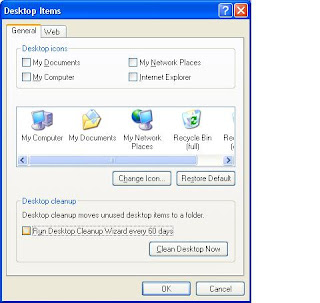


1. Right-click Desktop and click Properties.

2. Select the Desktop tab and click Customize Desktop.

3. Uncheck Run Desktop Cleanup Wizard Every 60 days

4. Apply changes.

Saturday, August 11, 2007

Windows XP into High Gear!

Use Windows XP own tools to maximize your PC performance with easy adjustment settings and without spending.

Here are some ways how to boost your PC performance:

1. Adjust visual effects by going to the Control Panel/System/Advanced/Performance Settings/Visual Effects and uncheck the boxes of your choice. Visual Effects makes your PC operate slower

2. Adjust power settings by ging to Control Panel/Power Options and adjust power settings of your choice.

3. Open Disk Cleanup by right-clicking the disk's icon in Explorer and choose Properties/General/Disk cleanup; or choose Start/Run and type cleanmgr.exe to delete unused files.

4. View Event Logger by going to Start/Run and type eventvwr.msc

5. Check your PC's Reliability and Performance by going to Start/Run and type perfmon.msc

6. Familiarize your current applications and processes by using Windows Task Manager by pressing [Ctrl]*[Shift]*[Esc] or [Ctrl]*[Alt]*[Del] or right-click on the desktop toolbar and select Task Manager.

7. Open your System Informations by going to Start/All Programs/Accessories/System Tools/System Information. 8. Run Disk Defragmenter by right-clicking the disk's icon in Explorer and select Properties/ Tools/Defragment now to compress space sort files and manage them.